
Business application · Production management
Bespoke production management software
Orders, planning, manufacturing, traceability, stock: Idéematic designs production management software modelled on your production chain, usable in the office and on the shop floor alike, and connected to your information system.
Definition
What is production management software?
Production management software, or computer-aided production management, organises and tracks a company’s production: what needs to be produced, when, by whom, with which materials and in what quantities. It handles two flows: the physical flow (procurement, stock, work in progress, finished products, distribution) and the information flow (procurement orders, customer orders, manufacturing, time spent, consumption).
Bespoke software answers your organisation’s questions precisely:
Features
What your production software can cover
Bespoke software includes only the modules you need, around a single database.
Orders and requirements
Customer or internal orders are centralised, with a cut-off time, then consolidated into a statement of what needs to be produced.
Planning
Allocation of work between teams, workstations and days, with each person’s workload and conflicts flagged.
Production orders and tasks
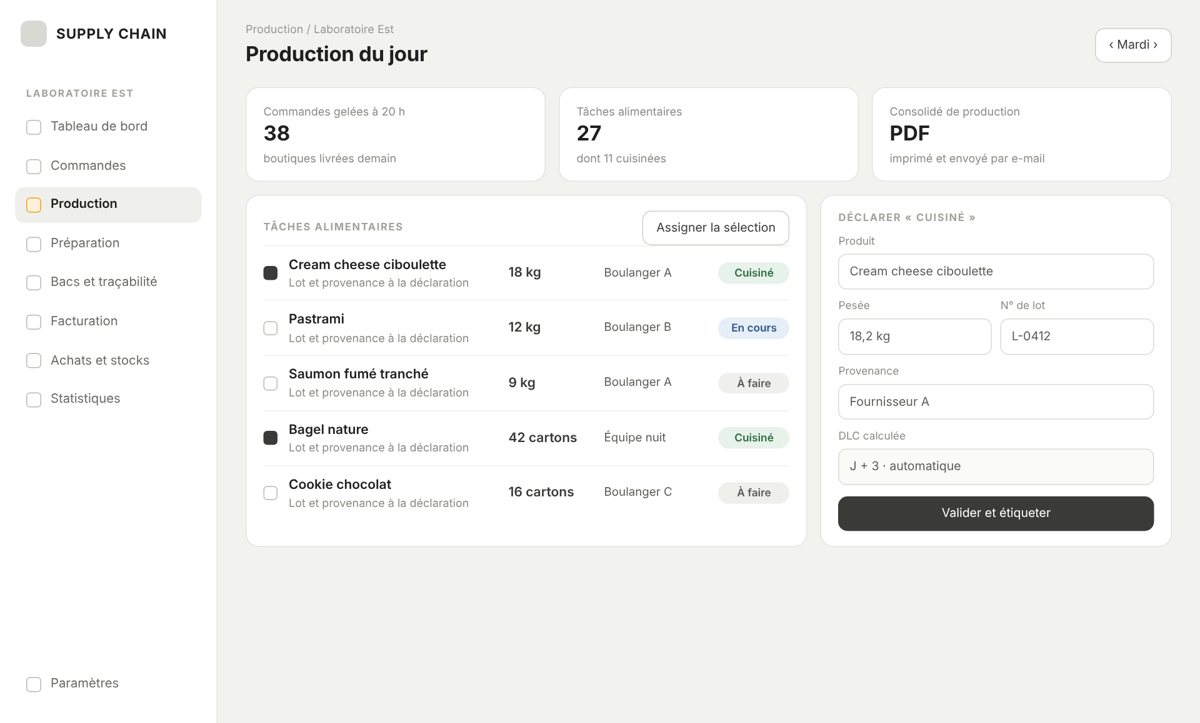
Tasks are assigned to operators, individually or by group, and each declares what they have produced.
Recipes and bills of materials
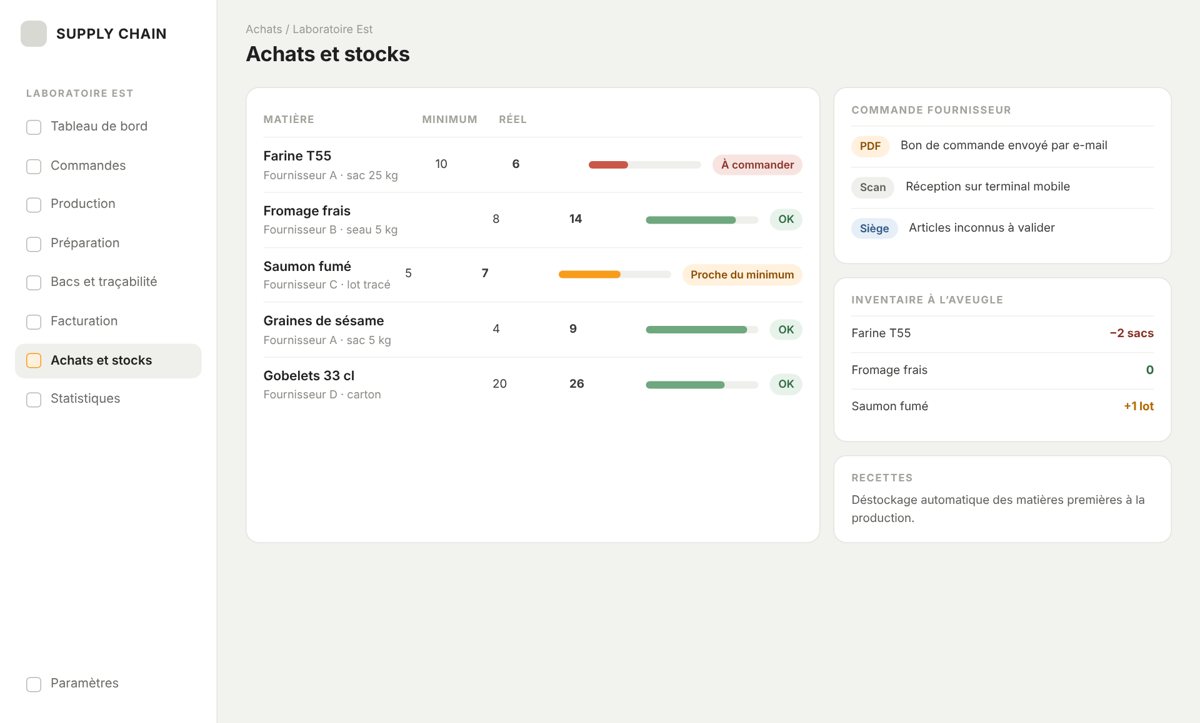
The composition of finished products makes it possible to calculate requirements and automatically deduct raw materials from stock.
Traceability
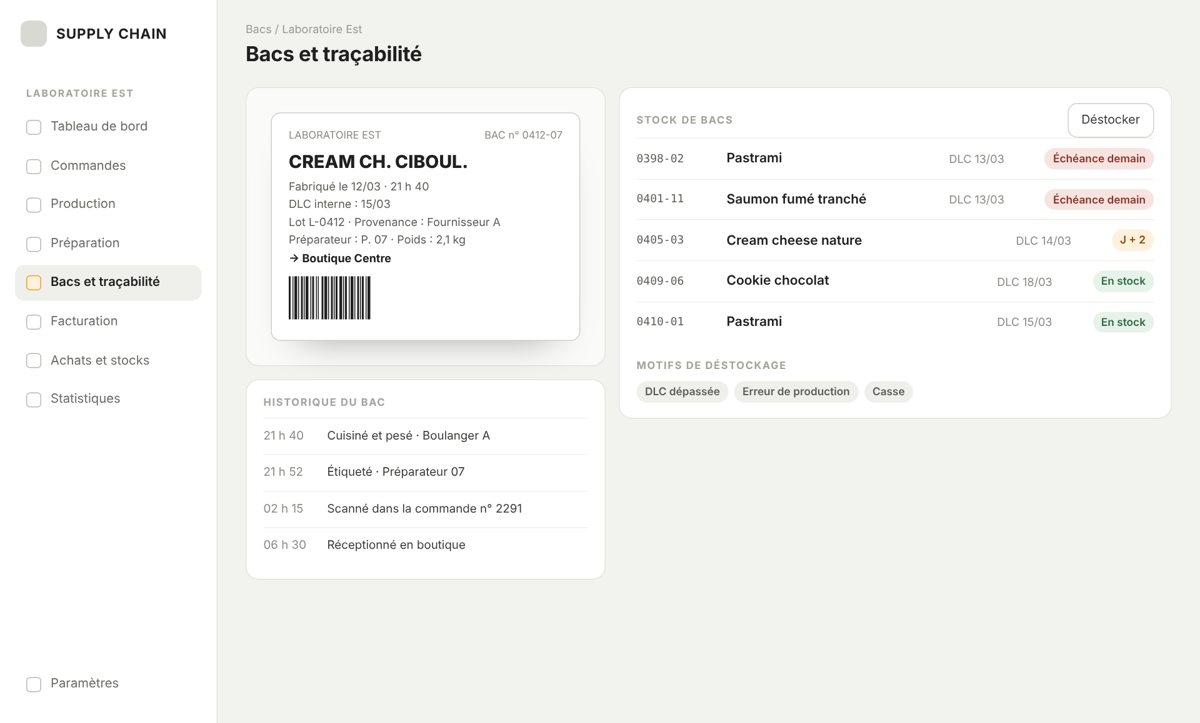
Batches, origin, weighing, production and use-by dates, barcode labels and full history.
Stock
Raw materials, work in progress and finished products, inventories on handheld terminals, justified stock withdrawals.
Purchasing and procurement
Supplier orders, goods receipt, settings specific to each production site.
Time spent and consumption
Entry of time and consumption to know the real cost of production.
Indicators and reports
Dashboards and reports built by site, product and period, exportable.
Case study
Bagelstein: from shop orders to crate-level traceability
For this franchised restaurant network, Idéematic designed a production extranet linking head office, the central kitchens and the shops.
Before
Every evening, the shops sent their order by email, in an Excel spreadsheet then passed on to the central kitchens.
Production
When orders close, each central kitchen gets a consolidated statement of what it must produce for the next day. Tasks are assigned to the bakers, who record weight, batch number and origin; the use-by date is calculated automatically.
Traceability
Each crate receives a barcode label. The crate stock flags those nearing their date, and the history shows who did what, and at what time.
Purchasing and stock
Recipes for finished products deduct raw materials from stock, supplier orders are received on a mobile terminal and inventories are carried out on handheld terminals.
On every workstation
In the office, on the shop floor and in the field
The software adapts to real workstations: office screens, barcode readers, tablets and phones.
In the office
Planning, order tracking, purchasing, invoicing and reports for head office and management.
On the shop floor
Production declarations, labels and barcode scanning on the kitchen or workshop terminals.
In the field
A mobile app for field teams, as in Techtime, which schedules sites and interventions and allocates resources.
Comparison
Packaged production software or bespoke software?
Packaged production management software suits standardised production processes. Bespoke becomes relevant when your rules, workstations or exchanges with other software do not fit a common model.
If your needs go beyond production (sales, purchasing, accounting, human resources), see bespoke ERP. To connect production software to your existing tools, see ERP, CRM and API integration.
| Packaged production software | Bespoke software | |
|---|---|---|
| Processes | A common way of working, adapted through configuration. | Your production rules, workstations and checks, as they are. |
| Features | A broad scope, part of which goes unused. | Only the useful modules, added as your needs arise. |
| Integration | Connectors provided by the vendor. | Exchanges designed with your ERP, accounting and other tools. |
| Enhancements | At the pace of the vendor’s roadmap. | At the pace of your organisation, as part of evolutive maintenance. |
| Well suited to | Standardised production processes. | Specific production, several sites or demanding traceability. |
Approach
Our approach for your production software
- 1
Explore your organisation
Your project manager studies the flows, workstations, business rules and tools in place with your teams.
- 2
Scope
The priority modules, key screens as wireframes, integrations and the production and delivery schedule.
- 3
Develop and deliver
Interim deliveries tested with users, and migration of existing data.
- 4
Host and evolve
Hosting on our dedicated servers or on yours, then corrective and evolutive maintenance.
Frequently asked questions
What is production management software?
Computer-aided production management refers to software that organises and tracks production: orders and requirements, planning, production orders, stock, purchasing, traceability, time spent and consumption.
Why develop bespoke production management software?
When your production rules, workstations or exchanges with other software do not fit into a software package. Bespoke software reflects your organisation as it is, and evolves with it.
Can the software run on terminals on the shop floor?
Yes. Bagelstein’s production extranet works just as well in the office as on the central kitchens’ barcode readers: production declarations, barcode labels, goods receipt and inventories.
Can it be connected to our ERP or accounting?
Yes. We design the exchanges with your existing software (ERP, accounting, CRM, invoicing tools) to avoid double entry.
We currently work with Excel spreadsheets: is that a good starting point?
Yes. That was the case for Bagelstein. Existing spreadsheets help understand your flows and rules, and their data can be migrated into the new software.
Who hosts and maintains the software?
The software can be hosted on our dedicated servers or on your own servers. We then provide its corrective and evolutive maintenance.
Software for your production?
Tell us about your organisation and your flows: together we will design the software that connects your teams, from order to delivery.