Contents
With the growing digitalisation of businesses, having an effective system for sharing information and collaborating online has never been more important. In this context, a custom extranet is a powerful tool that helps you centralise your data while offering an excellent user experience.
What is an extranet?
An extranet is a private, controlled computer network accessible through a simple internet connection. Its role is to allow a defined group of external users to connect so they can access private resources. It also lets companies exchange information with partners, customers and colleagues based in another location. Users have to enter their username and password to access the network’s interface.
What are the benefits of developing a custom extranet?
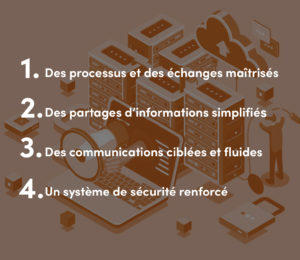
- Improve your business relationships by encouraging information sharing between customers, suppliers and contractors. Data processing will be smoother and, above all, fully traceable. This traceability opens up wide possibilities for analysis and therefore, for example, for putting improvement actions in place. On the user side, the service is available 24/7, with tracking options.
- When information is shared, you will receive it more quickly and easily. You will be able to work as a team and online on joint projects.
- You will save time when communicating with external people, thanks to an extranet tailored to your needs. This is particularly useful for targeted, appropriate communication campaigns.
- You will be able to share sensitive data securely.
4 steps to building your extranet
- 1
Needs analysis
Goals, features, specifications with all stakeholders.
- 2
Architecture
Modules, features, wireframes.
- 3
Development
Agile method, development, acceptance testing.
- 4
Delivery and maintenance
Secure server, adjustments, fixes.
1. Analysing your needs
It is important to define your objectives clearly. With this network, you will be able to collaborate and centralise your data. This phase also identifies the essential features the extranet will need to offer to meet your company’s needs. At this stage, make sure to involve all the project’s stakeholders. You will then have everything you need to draw up a complete specification that suits everyone.
2. Designing the overall system architecture
This step involves defining the various modules and features needed for the system as a whole to work properly. Wireframes (layout mock-ups) will need to be created to make communication easier and visualise your different objectives.
3. Developing your web application
The web development process must be methodical and Agile, so that it can adapt quickly to any need for adjustments and changes. Each feature will be coded by our specialist web development team. Many technologies can be used, including Ruby on Rails, React JS, Vue JS, Angular and C# and .NET. This phase requires solid technical expertise and absolute rigour to deliver a final result that meets the initial expectations, on time. Acceptance testing makes it possible to address the client’s comments and any imperfections found during the acceptance test, so that a fully functional network that meets users’ needs can go live. Acceptance testing is therefore an essential stage in an extranet project.
4. Delivering and maintaining your extranet
Once the testing phase is complete, the extranet will be deployed on a secure server accessible only to authorised users. Building an extranet is a complex process that requires careful planning and close collaboration between all the stakeholders involved. Our team can then make corrections and adjustments based on our clients’ feedback. This is what we call maintenance. Regular maintenance also keeps the system running smoothly by fixing errors or bugs, and keeps it secure in the long term.
3 platforms that offer extranet features
1. Salesforce is a very popular customer relationship management (CRM) platform that uses a custom extranet to give customers and business partners access to specific information such as product sheets, quotes and invoices.
2. Microsoft SharePoint is online collaboration software that includes a secure extranet with advanced features to make collaborative work easier between internal and external stakeholders. In particular, it enables document sharing, task planning and tracking, and instant messaging.
3. Jira Service Desk is a customer support platform that also includes a powerful extranet to make direct exchanges with customers easier while keeping them confidential.
These three examples show different forms an extranet can take to improve internal and external communication effectively, optimise data flows and enhance the overall user experience.
A few custom extranets built by Idéematic: Made in TH, a business extranet for a support network, Bagelstein, a production extranet, and MyInvest, a real estate extranet for the partners of the Vivialys group.
An extranet can be a very efficient collaborative platform for a company when, for example, it streamlines collaboration, organises and tracks activities and centralises information. With its many benefits and its ability to be tailored to your specific needs, an extranet is a wise investment for any company that wants to optimise its internal processes and strengthen collaboration with its external partners. Your extranet should adapt to your business, not the other way round!
Frequently asked questions
What is an extranet?
A private, controlled computer network that can be reached with a simple internet connection. It gives a defined group of external users (clients, partners, suppliers, remote staff) access to private resources, using a username and password.
What are the benefits of a custom extranet?
It improves business relationships by making it easier to share information, ensures the traceability of exchanges, provides a service available 24/7, saves time when communicating with external people and secures the sharing of sensitive data.
How do you build an extranet?
In four steps: needs analysis with all stakeholders, leading to the specifications; designing the architecture and wireframes; development, using an agile method, followed by acceptance testing; then delivery on a secure server and maintenance.
What are some examples of extranets?
Salesforce offers an extranet that lets clients and partners view product sheets, quotes or invoices; Microsoft SharePoint makes it easier to share documents and track tasks; Jira Service Desk is used for customer support. Idéematic has also built custom extranets such as Made in TH, Bagelstein and MyInvest.
Why choose a custom extranet?
Because it is tailored to your specific needs: it follows your processes, your users and your communication, instead of imposing those of a generic platform. Your extranet should adapt to your business, not the other way round.
How do you secure an extranet?
Access is restricted to authorised users, with a username and password, and the extranet is deployed on a secure server. Regular maintenance fixes errors and keeps it secure over time.