Contents
In recent years, many companies have contacted our development agency because they were considering building a custom application (or software) to meet very specific business needs. Most of the time, they had already put together a first test version, also known as a “proof of concept” or POC.
Very often, it had been built in an Excel spreadsheet.
The spreadsheet was then used as a framework for:
- data entry (a form)
- calculations (business rules)
- displaying results
in other words, much as a small application would. But of course, all of this was very limited, and limiting.
Validating the need with an Excel proof of concept
For very simple applications whose purpose is data entry, a small proof of concept (POC) can have several advantages.
Whether it is an Excel file or something else, a POC lets the company put its needs down on paper and then reach a certain level of maturity in expressing them.
In a way, the POC partly serves as a specification. It brings together certain features, data and related business logic, all of which will be examined in any case when defining and designing the final software. Finally, the Excel file makes it possible to test certain characteristics of the future software in the field: its legitimacy, its usefulness, its benefits and how likely future users are to accept it. Those users can also be involved in the thinking by sharing their vision, ideas and use cases.
But an Excel file obviously has many significant limitations and cannot replace a well-designed application:
- The file’s “features” remain very basic
- An Excel file can become corrupted over time, be deleted by mistake or accidentally overwritten by an earlier version…
- The user experience is very limited
- The same file is hard to use for several people at once
- And so on.
| Criterion | Excel file | Bespoke web application |
|---|---|---|
| Features | Basic data entry, formulas and charts | Features designed for your business |
| Reliability | File that can be corrupted, deleted or overwritten | Data stored in a database, backed up and versioned |
| Users | Hard to use by several people at once | Simultaneous access, with roles and permissions |
| User experience | Very limited | Screens designed for each use |
| Results | Reports and dashboards to format by hand | Reports, PDFs and dashboards generated automatically |
Using Excel to understand the 3 layers of the future application
As mentioned, an Excel file will guide thinking about the future software on 3 levels.
This is of course not the ideal way to go about it, but it reflects what many companies do at first, because after all, they often make do as best they can.
Data entry
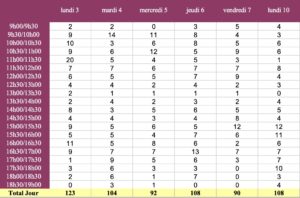 At this first level, the layout of a sheet in a spreadsheet such as Excel (for Windows), Numbers (for macOS) or Sheets (from Google) gives a clear picture of the list of input fields. Rows and columns provide a simple layout for labels and value input cells. You get an overview that can evolve over time. You will find most of the field types commonly used on the web: text fields, checkboxes, drop-down lists and so on. Some fields may only appear depending on others, and drop-down menu items can be linked to a list managed on another sheet. This often mirrors the logic of a settings panel, when one of the sheets contains data used to configure elements used elsewhere.
Data processing
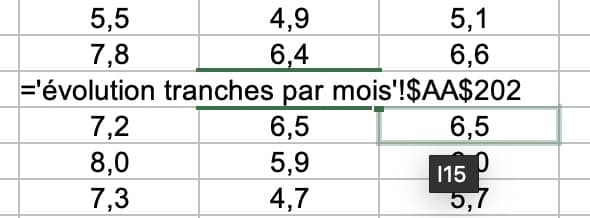
Displaying results
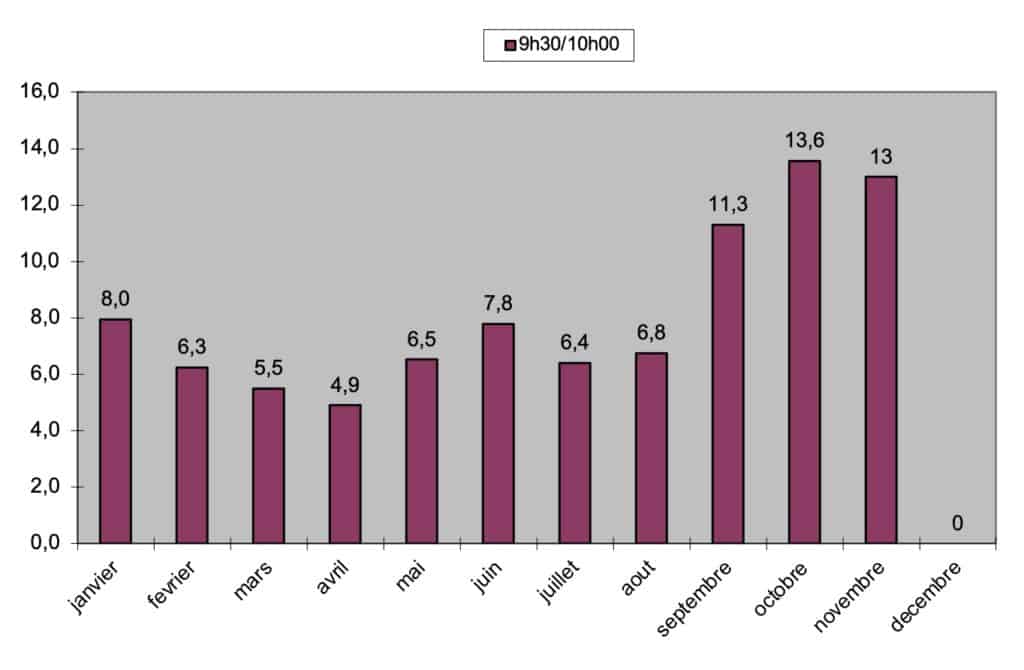
- Reports: this part is often exported as a PDF to be sent to a team or to clients. The aim is to have a summary of the data resulting from the entries.
- Dashboards: this kind of presentation is common within production teams, to steer their activities.
Of course, some Excel files use both types of view. There is no real limitation here.
From Excel to software development
Everything the Excel file presents can therefore be translated into a definition of needs. Naturally, this will need to be substantially completed by a project manager. When you work in Excel, you quickly get used to thinking in terms of what you know about the spreadsheet. The Excel file captures the need. Specifications, wireframes, structure. Mock-ups based on your brand guidelines. Code, acceptance testing, sign-off. An identity that makes people want to use it.
That is very limiting: you start from “how I know how to do it” to define “what I am going to do”.
In reality, you need to do exactly the opposite! You should start from thinking purely on paper, then use the most suitable tool to meet the need.
So you think about “what do I need”, and the answer comes from “how will we implement it”.
That is why, either way, it is essential for your project that you are supported by a project manager during the definition and design phases.
Once again, a first conceptual step carried out in an Excel file helps you refine your needs, and therefore stay in control of your project when working with a future development team.
Proof of concept
Definition and design
Visual design
Development and testing
Name and logo
Definition and design
 To sum up this phase, the project manager at the digital agency you choose will summarise your needs in a specification that also describes in detail the features, users, their roles, use cases, technical requirements, site structure and so on.
Wireframes, which are schematic views of the application (without visual design), will be produced so that you can clearly understand and validate the elements on each screen. Navigation between the software’s screens will be fully described, so that everyone agrees on how users will move through the application.
Production and delivery
 Once you know what you want and how you want it, the production phase can begin. The web or mobile designer will draw on the vocabulary of your brand guidelines on the one hand, and on the wireframes on the other, to design every screen of your application visually. This is very useful for getting a clear picture of the final application, and you will see the full benefit of an effective user experience! Next comes the development of your application. This is the most “technical” part, since it is purely about coding the application, that is, writing the many lines of code that will make up your software. Finally, you will need to test the application to confirm that the result fully meets your expectations.
Brand your application!
It may seem obvious, but it is absolutely essential to give your application a name! It should reflect how and where it is used. Like design, a good name also makes people want to use what it refers to.
Nobody wants to open a file called copy_reporting_data_Q3_2021_v4.xls!
On the other hand, opening an application with a pleasant or dynamic name will be far more motivating. The icing on the cake is to give it an original logo too.
Today, the proof-of-concept stage can also take the form of an interactive prototype built in a few days: that is the purpose of our app prototyping service. Project scoping then turns your file and your ways of working into precise specifications, before your bespoke web application is developed.
Conclusion
Putting your needs down on paper, for example by building a tool in Excel, can be a very good thing. Turning that Excel file into an application then means following the steps of any software development project. A web and mobile application development agency should in principle be able to handle this. But you should still check that the agency has a real interest in, and expertise for, software engineering. And guess what? We do :)
Frequently asked questions
Can you turn an Excel file into a web application?
Yes. The file is the starting point: its structure reveals the input fields, its formulas the business logic and its charts the expected results. A project manager builds on this to write the specifications, then the application is designed, developed and tested.
Why replace Excel with bespoke software?
Because an Excel file remains limited: basic features, a risk of corruption or overwriting, a poor user experience and difficult simultaneous use. A bespoke application makes the data reliable and adapts to your processes.
What is a proof of concept (POC)?
A first, simplified version that helps set out and refine the company’s need. Built in Excel or otherwise, it partly serves as a specification by showing the expected features, data and business rules.
What are the three layers of an application based on Excel?
Data entry (the spreadsheet fields), data processing (the formulas and conditions, in other words the business logic) and the display of results (reports and dashboards).
What are the steps to go from Excel to an application?
Definition and design with a project manager (specifications, wireframes), screen design, development, acceptance testing, then delivery. Giving the application a name and a logo also helps people adopt it.